Why Dynamics 365 Contact Center May Not Recognize Your Caller (Even When the Phone Number Is Correct)
Dynamics 365 Contact Center can automatically identify incoming callers, but phone-number formatting can prevent a match even when the number is correct. In this article I look at the underlying Record Identification Rule, E.164 normalization, Dataverse plug-ins, custom phone fields and duplicate-number scenarios.
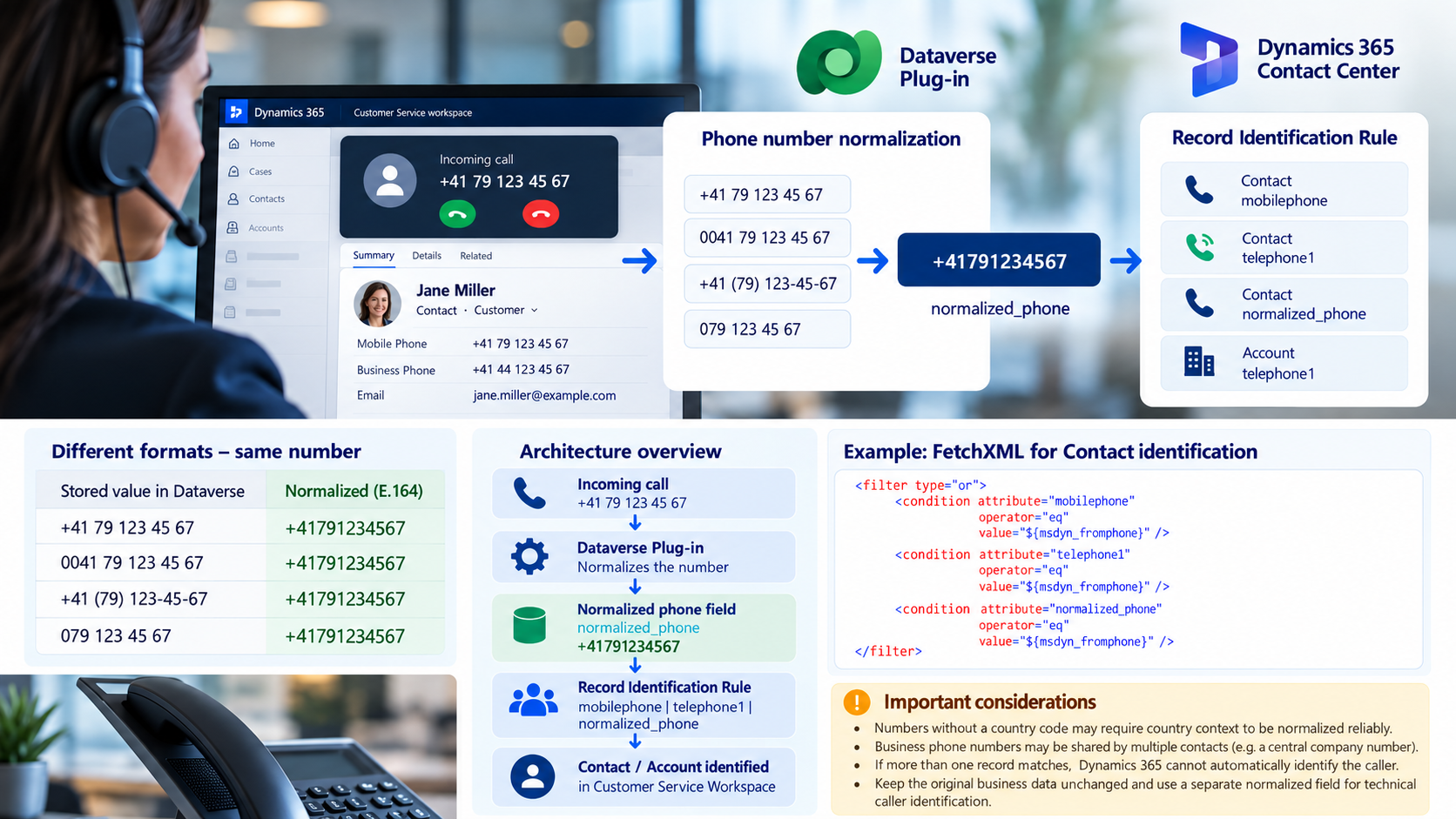
Automatic caller identification is one of those Dynamics 365 Contact Center features that seems straightforward: a customer calls, Dynamics finds the phone number, and the corresponding Contact or Account is displayed to the representative.
During a recent Dynamics 365 Contact Center implementation, however, we noticed that some callers were not identified even though their phone number clearly existed in Dataverse.
The reason was not routing, the Voice Workstream, or the Contact itself.
It was the phone number format.
How Voice Caller Identification Works
Dynamics 365 Contact Center uses the Record Identification Rule stored in the msdyn_recordidentificationrule field of the Voice Workstream.
In the standard rule I found in our environment, the relevant fields were:
Account
telephone1Contact
mobilephoneBoth are compared against the incoming phone number exposed through:
${msdyn_fromphone}
Microsoft also documents that additional fields can be added to the identification rule. For Contacts, this can include mobilephone, telephone1, telephone2, and telephone3; for Accounts, telephone1 and telephone2 can be used.
Microsoft Learn – Enable fields for identifying customers
How to Check Your Current Record Identification Rule
Before changing anything, I wanted to understand what Dynamics was actually using.
From a Dynamics 365 model-driven app, open the browser Developer Tools and execute:
(async () => {

    const ws = await Xrm.WebApi.retrieveMultipleRecords(
        "msdyn_liveworkstream",
        "?$select=msdyn_name,msdyn_liveworkstreamid,msdyn_recordidentificationrule"
    );

    const workstreams = ws.entities
        .filter(x => x.msdyn_recordidentificationrule)
        .map(x => ({
            name: x.msdyn_name,
            id: x.msdyn_liveworkstreamid,
            rule: x.msdyn_recordidentificationrule
        }));

    console.table(
        workstreams.map(x => ({
            Workstream: x.name,
            WorkstreamId: x.id,
            HasIdentificationRule: !!x.rule
        }))
    );

    workstreams.forEach(x => {
        console.group(x.name);
        console.log(x.rule);
        console.groupEnd();
    });

    return workstreams;

})();
This retrieves all Workstreams that have a Record Identification Rule and displays the actual XML.
Microsoft also documents accessing msdyn_recordidentificationrule directly from the msdyn_liveworkstream record. Microsoft Learn
What I Found
The relevant part for Accounts was:
<condition
    attribute="telephone1"
    operator="eq"
    source="msdyn_msdyn_ocliveworkitem_msdyn_ocphonecallengagementctx_liveworkitemid"
    value="${msdyn_fromphone}" />
And for Contacts:
<condition
    attribute="mobilephone"
    operator="eq"
    source="msdyn_msdyn_ocliveworkitem_msdyn_ocphonecallengagementctx_liveworkitemid"
    value="${msdyn_fromphone}" />
The important part here is:
operator="eq"This is an equality comparison.
That small detail explains the issue we encountered.
Consider the following Contact Mobile Phone:
+41 79 111 22 33The incoming phone number from the Voice channel was:
+41791112233Same Phone Number for a Human, Different Value for Dynamics
For us, these are obviously the same phone number.
For an exact string comparison, they are different:
+41 79 111 22 33
≠
+41791112233
After storing the Mobile Phone as:
+41791112233the Contact was identified immediately.
Microsoft Support also confirmed in our case that the standard identification mechanism doesn’t automatically normalize differently formatted Dataverse phone numbers before performing this comparison.
The Dataverse Phone Field Does Not Solve This
This leads to another important point.
A Dataverse Phone field doesn’t automatically enforce E.164 normalization.
Therefore, all of these values can potentially exist in your CRM:
+4171112233

+41 79 111 22 33

0041 79 111 22 33

079 111 22 33
They may represent the same telephone number, but they are not necessarily equivalent for Voice Caller Identification.
This means that phone number normalization becomes a data architecture concern, not simply a UI formatting concern.
Why We Didn’t Change the Existing Phone Fields
In our project, the existing Mobile Phone and Business Phone values were also related to an ERP integration and downstream processes.
Changing:
+41 79 111 22 33into:
+41791112233directly in the original field could therefore have side effects outside Dynamics 365 Contact Center.
Instead, we decided to introduce a separate technical field, for example:
Normalized Phone NumberThe original value remains untouched, while the technical field contains:
Normalized Phone
+41791112233
This gives us a clear separation between:
Business / ERP representation
and
technical caller identification representation
Normalizing the Number with a Dataverse Plug-in
We decided to populate the normalized field with a synchronous PreOperation Dataverse plug-in.
Conceptually:
Contact created or updated
        ↓
Phone number changed
        ↓
Normalization Plug-in
        ↓
normalizedphonenumber
        ↓
+41791112233
For numbers that already contain an international country code, normalization is relatively straightforward.
For example:
+41 79 111 22 33
→
+41791112233
+41 (79) 111-22-33
→
+41791112233
0041 79 111 22 33
→
+41791112233
The logic can remove spaces, brackets, hyphens and other presentation characters and replace a leading 00 with +.
Formatting Is Not the Same as E.164 Normalization
There is an important limitation.
Consider this number:
079 111 22 33To convert it into:
+41791112233we need to know that this is a Swiss number.
In an international CRM system we cannot simply assume that every number starting with 0 belongs to Switzerland.
A German number such as:
0176 12345678would require:
+4917612345678Therefore, I distinguish between two cases.
When the number already contains + or an international 00 prefix, we can normalize it safely.
When the country code is missing, we need additional context such as the Contact country, a reliable source-system country code, or a proper phone-number parsing library.
Otherwise, I prefer leaving the normalized field empty instead of generating an incorrect telephone number.
Extending the Caller Identification Rule
After creating the normalized field, the Voice Workstream Record Identification Rule can also be extended.
Microsoft explicitly supports modifying the FetchXML used for customer identification and adding additional Dataverse fields. Microsoft Learn
For example:
<filter type="or">

    <condition
        attribute="mobilephone"
        operator="eq"
        source="msdyn_msdyn_ocliveworkitem_msdyn_ocphonecallengagementctx_liveworkitemid"
        value="${msdyn_fromphone}" />

    <condition
        attribute="telephone1"
        operator="eq"
        source="msdyn_msdyn_ocliveworkitem_msdyn_ocphonecallengagementctx_liveworkitemid"
        value="${msdyn_fromphone}" />

    <condition
        attribute="pub_normalizedphonenumber"
        operator="eq"
        source="msdyn_msdyn_ocliveworkitem_msdyn_ocphonecallengagementctx_liveworkitemid"
        value="${msdyn_fromphone}" />

</filter>
This provides a useful transition strategy.
If the original mobilephone or telephone1 already has exactly the format received by Contact Center, it continues to match.
If the value contains spaces or other formatting, the normalized technical field can provide the match instead.
The Actual Rule from My Environment
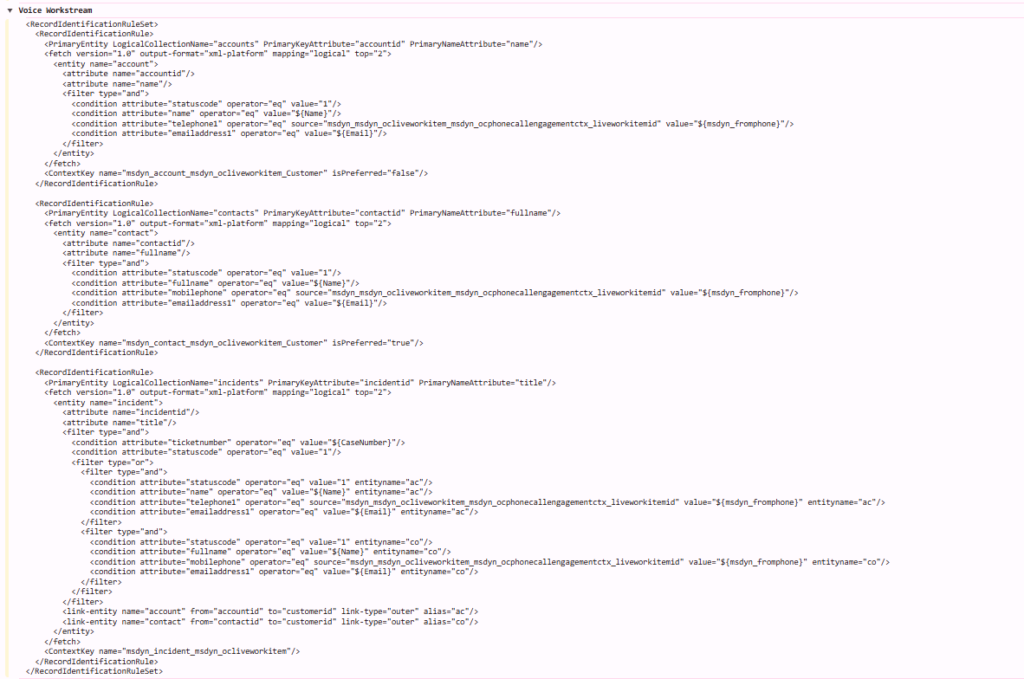
For reference, this is the Record Identification Rule that I retrieved before making any changes:
<RecordIdentificationRuleSet>
  <RecordIdentificationRule>
    <PrimaryEntity LogicalCollectionName="accounts"
                   PrimaryKeyAttribute="accountid"
                   PrimaryNameAttribute="name"/>

    <fetch version="1.0"
           output-format="xml-platform"
           mapping="logical"
           top="2">

      <entity name="account">

        <attribute name="accountid"/>
        <attribute name="name"/>

        <filter type="and">

          <condition attribute="statuscode"
                     operator="eq"
                     value="1"/>

          <condition attribute="name"
                     operator="eq"
                     value="${Name}"/>

          <condition
              attribute="telephone1"
              operator="eq"
              source="msdyn_msdyn_ocliveworkitem_msdyn_ocphonecallengagementctx_liveworkitemid"
              value="${msdyn_fromphone}"/>

          <condition attribute="emailaddress1"
                     operator="eq"
                     value="${Email}"/>

        </filter>

      </entity>

    </fetch>

    <ContextKey
        name="msdyn_account_msdyn_ocliveworkitem_Customer"
        isPreferred="false"/>

  </RecordIdentificationRule>


  <RecordIdentificationRule>

    <PrimaryEntity LogicalCollectionName="contacts"
                   PrimaryKeyAttribute="contactid"
                   PrimaryNameAttribute="fullname"/>

    <fetch version="1.0"
           output-format="xml-platform"
           mapping="logical"
           top="2">

      <entity name="contact">

        <attribute name="contactid"/>
        <attribute name="fullname"/>

        <filter type="and">

          <condition attribute="statuscode"
                     operator="eq"
                     value="1"/>

          <condition attribute="fullname"
                     operator="eq"
                     value="${Name}"/>

          <condition
              attribute="mobilephone"
              operator="eq"
              source="msdyn_msdyn_ocliveworkitem_msdyn_ocphonecallengagementctx_liveworkitemid"
              value="${msdyn_fromphone}"/>

          <condition attribute="emailaddress1"
                     operator="eq"
                     value="${Email}"/>

        </filter>

      </entity>

    </fetch>

    <ContextKey
        name="msdyn_contact_msdyn_ocliveworkitem_Customer"
        isPreferred="true"/>

  </RecordIdentificationRule>


  <RecordIdentificationRule>

    <PrimaryEntity LogicalCollectionName="incidents"
                   PrimaryKeyAttribute="incidentid"
                   PrimaryNameAttribute="title"/>

    <fetch version="1.0"
           output-format="xml-platform"
           mapping="logical"
           top="2">

      <entity name="incident">

        <attribute name="incidentid"/>
        <attribute name="title"/>

        <filter type="and">

          <condition attribute="ticketnumber"
                     operator="eq"
                     value="${CaseNumber}"/>

          <condition attribute="statuscode"
                     operator="eq"
                     value="1"/>

          <filter type="or">

            <filter type="and">

              <condition attribute="statuscode"
                         operator="eq"
                         value="1"
                         entityname="ac"/>

              <condition attribute="name"
                         operator="eq"
                         value="${Name}"
                         entityname="ac"/>

              <condition
                  attribute="telephone1"
                  operator="eq"
                  source="msdyn_msdyn_ocliveworkitem_msdyn_ocphonecallengagementctx_liveworkitemid"
                  value="${msdyn_fromphone}"
                  entityname="ac"/>

              <condition attribute="emailaddress1"
                         operator="eq"
                         value="${Email}"
                         entityname="ac"/>

            </filter>

            <filter type="and">

              <condition attribute="statuscode"
                         operator="eq"
                         value="1"
                         entityname="co"/>

              <condition attribute="fullname"
                         operator="eq"
                         value="${Name}"
                         entityname="co"/>

              <condition
                  attribute="mobilephone"
                  operator="eq"
                  source="msdyn_msdyn_ocliveworkitem_msdyn_ocphonecallengagementctx_liveworkitemid"
                  value="${msdyn_fromphone}"
                  entityname="co"/>

              <condition attribute="emailaddress1"
                         operator="eq"
                         value="${Email}"
                         entityname="co"/>

            </filter>

          </filter>

        </filter>

        <link-entity name="account"
                     from="accountid"
                     to="customerid"
                     link-type="outer"
                     alias="ac"/>

        <link-entity name="contact"
                     from="contactid"
                     to="customerid"
                     link-type="outer"
                     alias="co"/>

      </entity>

    </fetch>

    <ContextKey name="msdyn_incident_msdyn_ocliveworkitem"/>

  </RecordIdentificationRule>

</RecordIdentificationRuleSet>
What interested me most were these two lines:
Account:
attribute="telephone1"
value="${msdyn_fromphone}"
and:
Contact:
attribute="mobilephone"
value="${msdyn_fromphone}"
They made the matching behavior much easier to understand.
There Is Another Problem: Duplicate Phone Numbers
Even perfect normalization doesn’t necessarily mean that Dynamics can identify the caller.
Imagine three Contacts containing:
Contact A
+41441234567

Contact B
+41441234567

Contact C
+41441234567
This is common when telephone1 contains the company’s switchboard or central telephone number.
A phone number can therefore be technically valid and perfectly normalized but still be a poor identifier for an individual Contact.
The Record Identification FetchXML even uses:
top="2"which allows the identification mechanism to determine that more than one matching record exists.
This is one reason I consider mobilephone a stronger identifier for an individual Contact, while a shared business number may be more appropriate for identifying an Account.
My Architecture Takeaway
The final architecture is relatively simple:
ERP / User / Integration
        ↓

Original phone number
+41 79 111 22 33
        ↓

Dataverse PreOperation Plug-in
        ↓

Normalized technical field
+41791112233
        ↓

Voice Record Identification Rule
        ↓

${msdyn_fromphone}
+41791112233
        ↓

Unique Contact / Account
What started as a small phone-number formatting issue became an interesting reminder that data representation and identity are not the same thing.
A Dataverse Phone field can contain a perfectly valid business representation of a phone number while still being unsuitable for an exact machine-to-machine comparison.
If Dynamics 365 Contact Center Voice is part of your architecture, I would therefore consider three things early in the design:
- Which Contact and Account phone fields should actually be used for caller identification?
- Are those values stored consistently enough for exact matching?
- Who owns the phone number format — Dynamics, an ERP, another master-data system, or an integration?
If the answer isn’t clear, introducing a dedicated normalized technical field can be much safer than changing the original business data.
Microsoft Documentation
Microsoft documents how the Record Identification Rule can be inspected and extended, including support for Contact mobilephone, telephone1, telephone2, telephone3 and Account telephone1 / telephone2.
Enable fields for account and contact for identifying customers
A useful detail from the documentation is that Microsoft explicitly describes this feature as a way to use Dataverse fields other than the default fields, and the FetchXML examples show the comparison against ${msdyn_fromphone} using operator="eq".